
To type accented letters and other symbols on Windows you can use the numeric codes listed below. These should work in any program.
How it works:
To type a lower case letter with an acute accent on it (á
é í ó ú) you can:
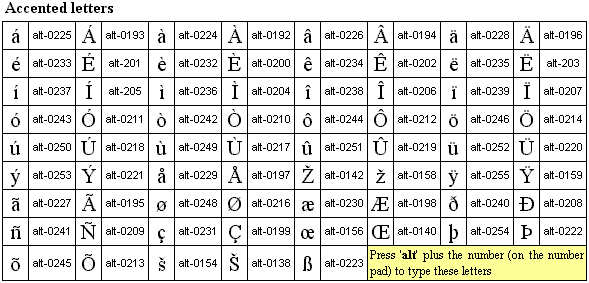
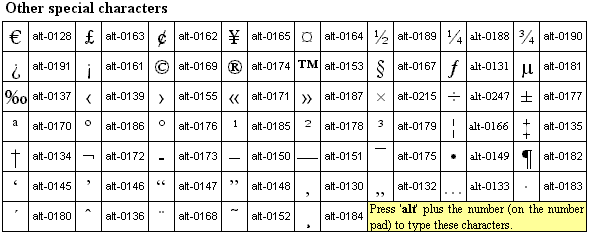
Click here to download an Excel spreadsheet of these codes
Note: the combinations work with the Welsh (United Kingdom) keyboard layout.
You can also assign requently-used letters to particular key combinations.
Orthographic diacritics and multilingual computing
http://www.phon.ucl.ac.uk/home/wells/dia/diacritics-revised.htm
Typing International Accent Marks and Diacriticals
http://www.starr.net/is/type/kbh.html
International characters
http://www.lrc.salemstate.edu/keyboard.htm
Free keyboard layout for typing many European languages and Japanese rōmaji
http://goo.gl/VloRCe
Character finder - a site where you can find out which accented letters or other characters are used in which language(s), and other useful information about characters, fonts and unicode: http://transliteration.eki.ee/
[top]

Why not share this page:

If you like this site and find it useful, you can support it by making a donation via PayPal or Patreon, or by contributing in other ways. Omniglot is how I make my living.
Note: all links on this site to Amazon.com


Get a 30-day Free Trial of Amazon Prime (UK)
If you're looking for home or car insurance in the UK, why not try Policy Expert?
[top]


